Iphone To Hdmi

SKU: NGSL.800.085

Iphone To Hdmi

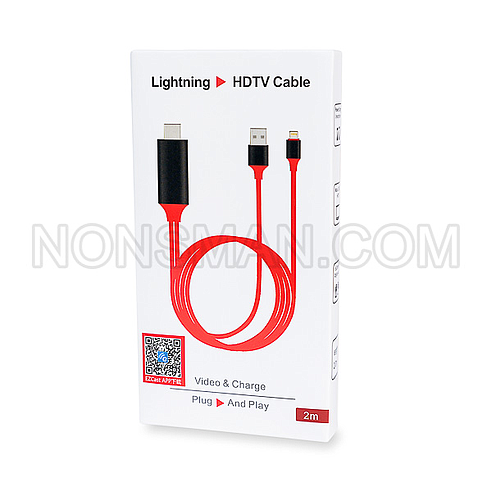
Lightning to HDMI Cable
HDMI TV CABLE LIGHTNING TO HDMI ADAPTER CONNECTOR FOR IPHONE 11 PRO X XS 5 6 7 8 IPAD MINI
HDMI adapter for iPhone/Ipad, which supports iPhone and Ipad featuring the lightning connector,
use it with iPhone or Ipad to enjoy your favorite local or online entertainment easily on your
HDTV or projector in up to 1080p HD display movies. Tv shows, music, video, audio, photo, and more from
Youtube, IE browser, chrome browser and etc,

Apple Shopping Event

Hurry and get discounts on all Apple devices up to 20%

Sale_coupon_15

14,300.00

10 in stock

10 in stock

14 People watching this product now!
  • Pick up from the Woodmart Store

To pick up today

Free

  • Courier delivery

Our courier will deliver to the specified address

2-3 Days

Free

  • DHL Courier delivery

DHL courier will deliver to the specified address

2-3 Days

Free

  • Warranty 1 year
  • Free 30-Day returns

Payment Methods:

Description

Iphone To Hdmi

To connect an iPhone to an HDMI display, use an?Apple Lightning Digital AV Adapter?(for iPhone 14 and earlier) or a?USB-C to HDMI adapter?(for iPhone 15 and later). Plug the adapter into the iPhone?s charging port, then connect an HDMI cable from the adapter to your TV, monitor, or projector.
Key Details:
    • Mirroring:?Connectors enable 1080p HD (Lightning) or 4K (USB-C) screen mirroring for apps, presentations, and websites.
    • Power:?Lightning adapters often require a separate charger connected to the port on the adapter itself.
    • Limitations:
      ?Due to HDCP copyright protection, some apps like Netflix, Amazon Video, and Hulu may not display content, while YouTube and local videos usually work.
  • Compatibility:?Works with iPhone 5 and later (Lightning) and iPhone 15/16/17 (USB-C).
Steps to Connect:
  1. Connect the Adapter/Cable: Plug the adapter into your iPhone’s charging port.
  2. Connect HDMI: Plug one end of your HDMI cable into the adapter and the other into your display.
  3. Choose Input: Set your display (TV/Monitor) to the correct HDMI input.
  4. Trust: Select “Trust” on your iPhone screen if prompted and wait a few seconds

Specification

Overview

Weight 0.07 lbs

Processor

Weight 0.07 lbs

Display

Weight 0.07 lbs

RAM

Weight 0.07 lbs

Storage

Weight 0.07 lbs

Video Card

Weight 0.07 lbs

Connectivity

Weight 0.07 lbs

Features

Weight 0.07 lbs

Battery

Weight 0.07 lbs

General

Weight 0.07 lbs

Customer Reviews